
Access and search
XING TalentManager opens XING's DACH talent pool with search, filters, projects, talent pools, XING messaging and reports. This is where you find, organise and assess profiles.
We recommend ZingBot when your DACH recruiting team already has a reviewed XING list—ideally from its own XING TalentManager—and regularly sends outreach and follow-ups. TalentManager opens XING's DACH talent pool, filters profiles and organises searches, projects and talent pools. ZingBot imports the approved search or project and runs the prepared sequence inside your own XING account. Your recruiters define the target profile, select candidates, approve the copy and own every reply and hiring decision. The clearest fit is a team repeatedly opening profiles, copying names and roles, personalising the same message and tracking follow-ups by hand. Setup is not worthwhile for three or four profiles. Candidate discovery, ATS work and recruiting judgement also stay outside the workflow. Selection stays with your team. Because ZingBot uses your real XING session, XING's terms, package quotas, account-specific limits and any security or verification prompts still apply.
The term sounds like one product. In practice, it covers three jobs. Strong recruiting teams separate access and search, list preparation and outreach, then give each step to the tool built for it.
XING TalentManager opens XING's DACH talent pool with search, filters, projects, talent pools, XING messaging and reports. This is where you find, organise and assess profiles.
Search, data and export tools turn existing profiles into a working list. Their value is clean data and a hand-off that does not create another round of spreadsheet work.
Outreach workflow tools execute a reviewed list. ZingBot sends through your own XING account, follows up and stops the sequence when a person replies.
TalentManager, ZingBot and the recruiter take on clearly separated work in sequence. Search stays with the sourcing team, repeatable outreach sits in the workflow, and every conversation belongs to a person.
| Tool or role | What it does | What it does not replace |
|---|---|---|
| XING TalentManager | Opens XING's DACH talent pool and provides search, filters, projects, talent pools, XING messaging and reports. You need your own licence to import a search or project into ZingBot. | The recruiter still owns the target profile, selection and hiring judgement; ZingBot handles the repeatable outreach workflow for the reviewed list. |
| ZingBot | Imports a reviewed TalentManager search or project, with a standard XING import available as an alternative. Sends approved messages and follow-ups inside your own XING account, then stops for a person after they reply. | Candidate discovery, selection, ATS work and the reply conversation stay with the recruiting team. |
| Recruiter | Defines the target profile, reviews and selects candidates, approves the copy, reads replies and owns the conversation and hiring decision. | Does not have to message the reviewed list profile by profile or track every follow-up by hand. |
Effixient is no longer active: on 5 November 2026, effixient.io showed a generic parked-domain page. Our assessment and the route to an active XING workflow are in the Effixient comparison. Read the Effixient comparison
ZingBot starts with a list you have already reviewed. To import from a TalentManager search or TalentManager project, you need your own XING TalentManager licence. You then set up the outreach once and let the workflow run inside your XING account.
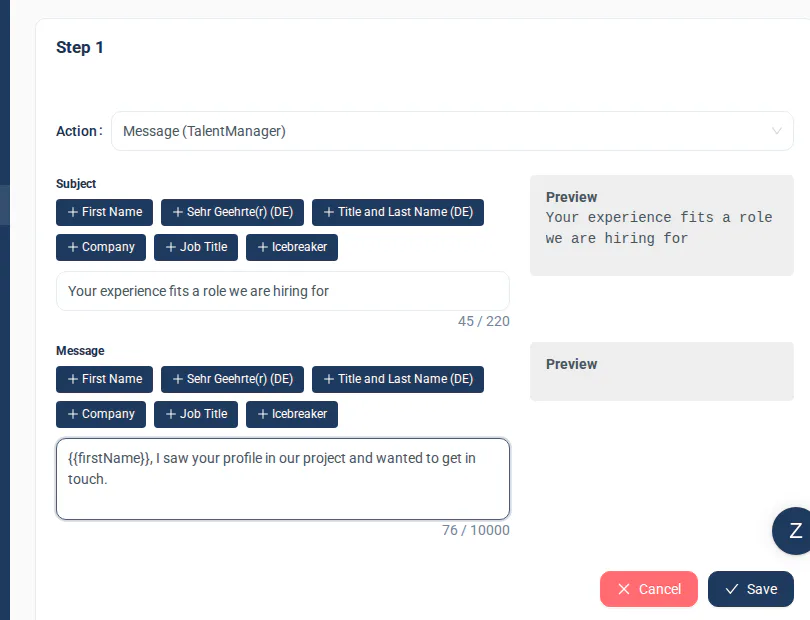
The cleanest process has a visible hand-off. Nobody has to guess whether the list is ready or who owns the reply.
Find profiles in XING TalentManager and refine the search criteria, filters or projects.
Review the profiles and decide which candidates should receive the outreach.
With your own XING TalentManager licence, import the reviewed list from a search or project into ZingBot.
ZingBot sends the prepared message and follow-ups through your own XING account.
A reply ends the sequence for that person. You read it in the XING inbox and continue the candidate conversation yourself.
ZingBot works through your real XING session. XING's terms, package quotas, account-specific limits and security or verification prompts therefore continue to apply. Your team remains responsible for the account: if XING limits an action or requests a check, pause the workflow and read the notice in the account before continuing.
Turn your TalentManager list into conversations.
You choose the candidates. ZingBot handles messages and follow-ups. You take over the replies.
7-day free trial, then €405 per quarter per seat.